Luminar Neo Review 2026 : Is it still worth it?
By a professional photographer with 14 years experience · Updated 24th of April 2026
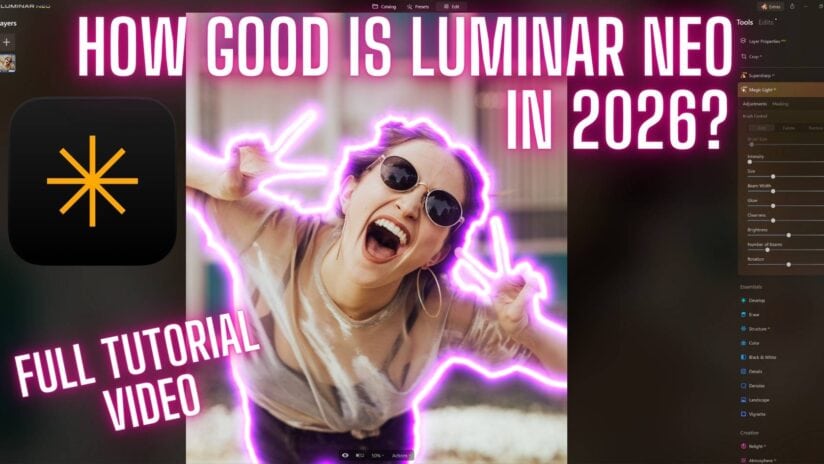
Ultimate Luminar Neo review for 2026
Just how good is Luminar Neo in 2026 and more importantly is it right for you? Well in this Luminar Neo review, I will not only walk you through its features but also how it has worked for me and how it could for you too.
To me Luminar Neo in 2026 is a truly incredible photography editing platform, it’s full of fantastic AI editing tools that not only save you time but also help you to produce some stunning results in just a few seconds.
With the addition of the sublime expansion packs, plus the major Fall 2025 and Spring 2026 updates (including Light Depth, Restoration, AI Assistant, and enhanced masking), Skylum’s Luminar Neo has grown into a photography editing powerhouse. Better still for the price and what you get, it’s truly amazing value for money.
Before we get into the review I want to say I also have a section further down this page on all its features and my full Luminar Neo review video.
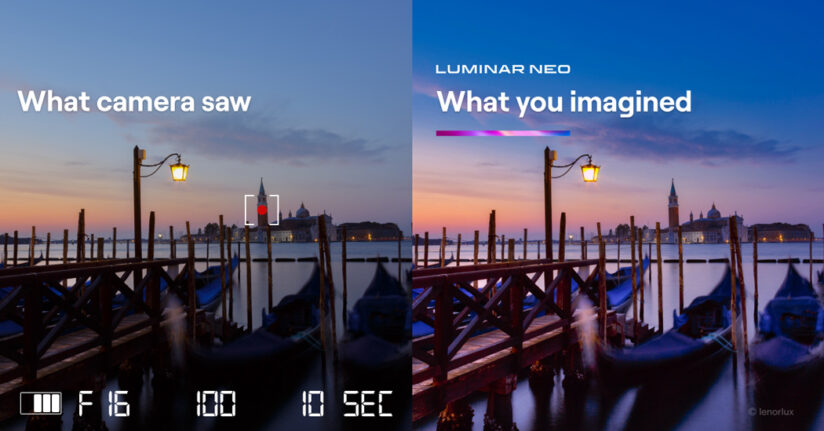
Take the photograph below as an example of what Neo can do, in seconds it can utterly transform your photographs and thankfully it’s every bit at home with Portraits as it is with landscapes.
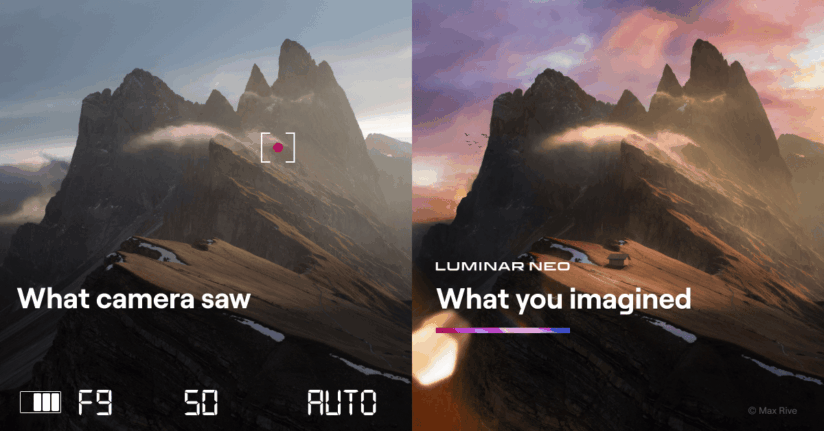
Table of Contents
Luminar Neo Review: Overview & Verdict
For me, Luminar Neo is probably the best all-round photography editing software application available in 2026 as it’s as comfortable editing Landscape photography as it is at editing portraits, wildlife photography in fact any genre of photography. The AI tools work and they are serious time savers.
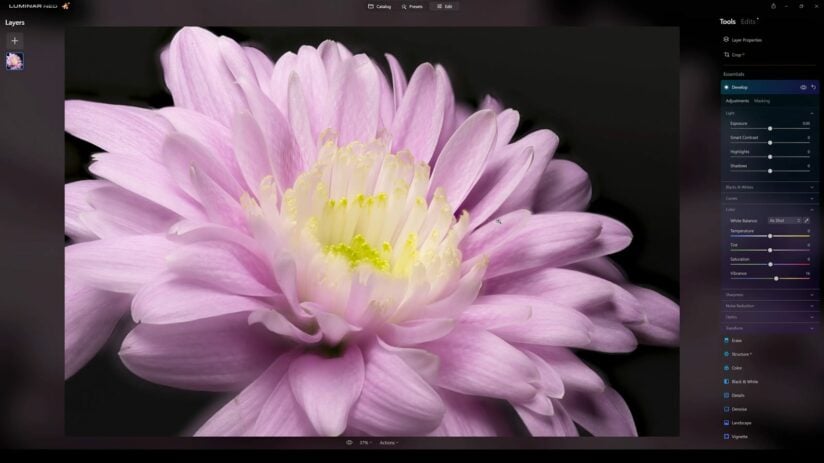
Of course, all your standard editing functions are included also so you can easily adjust your Exposure, Contrast, Highlights, Shadow, Whites, Blacks, Vibrancy, Saturations, details etc… just by adjusting the corresponding slider. Again if you watch the Luminar Neo Review video above I walk you through all of those settings.
User Interface
The user interface is very intuitive and really straightforward to use as you can see in my video above, so the learning curve for anyone new to editing in Neo is really short. In fact, the very first time I used Luminar Neo I felt completely at home with it in under 10 minutes.
The sliders are all grouped into their relevant categories which speeds up your editing workflow dramatically, the presets or templates also help to get your editing going in the right direction especially if you are new to editing and unsure of the look you want to achieve, you can just quickly browse through near finished edits in seconds.
All you have to do is click on one of the presets for it to be applied to your photograph and then adjust the slider to increase or decrease the effect of the edit and you’re done.
Or you can even let Accent AI work its AI magic and auto edit the photo for you which is ideal for very fast edits or to just give you a good base edit to start with, that’s personally how I use Accent AI.
As you can see Luminar is designed for speed and ease of use making it the perfect editing platform for everyone.
Of course, there are a load more features to talk you through in this Luminar Neo review and don’t worry I will get to all of them further down the page.
You can watch my full Luminar Neo Review video below or read on to learn more…

Luminar Neo Review 2026 — Features, Pros & Cons + Verdict

In‑depth Luminar Neo review 2026 — explore features, AI tools, performance, pros & cons, comparisons, and whether it’s worth your money.
4.9
Pros
- Excellent landscape editing tools, including Sky AI and Atmosphere AI.
- Strong portrait features with intuitive AI enhancements.
- All‑in‑one photo editor with both basic and advanced tools.
- Powerful AI tools that save time without sacrificing quality.
- Cross‑platform editing on Windows and macOS.
- User‑friendly interface with a gentle learning curve for beginners.
Cons
- Can require a fast computer for smooth performance.
- Cataloging and file management tools are less advanced than Lightroom’s.
- Some AI tools may not always give perfect results and need manual adjustment.
- Occasional lag or UI quirks reported on certain systems.
What’s new in Luminar Neo in 2026
A lot has been added to Luminar Neo over the past 12 months across the Fall 2025 and Spring 2026 updates. Here’s a quick rundown of the major new features, and I’ll cover the most relevant ones in more detail further down the page.
Light Depth (Fall 2025)
The big one. Light Depth replaces the older Relight AI with a proper 3D lighting engine. You can now place virtual light sources anywhere in three-dimensional space within your image, adjusting direction, intensity, temperature and brightness for near and far areas independently. For landscape work — shooting a West Cork coastal scene where the foreground fell into shadow, for instance — this is transformative.
Photo Restoration (Fall 2025)
Feed it an old, damaged, faded photograph and the AI works to repair it. Results aren’t perfect for every image but for family photos, old prints and archival work, it’s one of the best implementations I’ve seen.
AI Assistant (Fall 2025)
Analyses your image and offers relevant editing suggestions. Not intrusive — you can ignore it entirely — but genuinely useful for beginners and when teaching workshop clients.
Luminar Ecosystem (Fall 2025)
Start editing on your phone or tablet using the Luminar mobile app, then finish on your desktop in Luminar Neo. Edits sync across devices.
Luminar Spaces (Fall 2025)
Publish your photos directly to online galleries from inside Luminar Neo. Useful for sharing client previews without needing a separate website.
Enhanced Bokeh AI (Spring 2026)
The old Portrait Bokeh AI was rebuilt with a 3D depth model similar to Light Depth, giving much finer control over focus distance and background blur.
Improved Skin AI (Spring 2026)
Dedicated Blemish Removal, Shine Removal, Skin Smoothing, and Dark Circles Removal controls — each fine-tuned and individually controllable.
Mask Feathering and Shift Edges (Spring 2026)
My personal favourite from the Spring 2026 update. Mask Feathering allows soft, gradual transitions at mask edges. Shift Edges lets you refine exactly where the mask boundary falls. Both were long-standing gaps compared to Photoshop, and they’re now handled cleanly in Neo.
New camera support (Spring 2026)
RAW support added for Sony A9 III, Hasselblad CFV 100C, Leica SL3, OM System OM-1 Mark II, and Pentax K-3 Mark III Monochrome. Nikon Z-series support (Z8, Z7ii, Z6iii) remains solid.
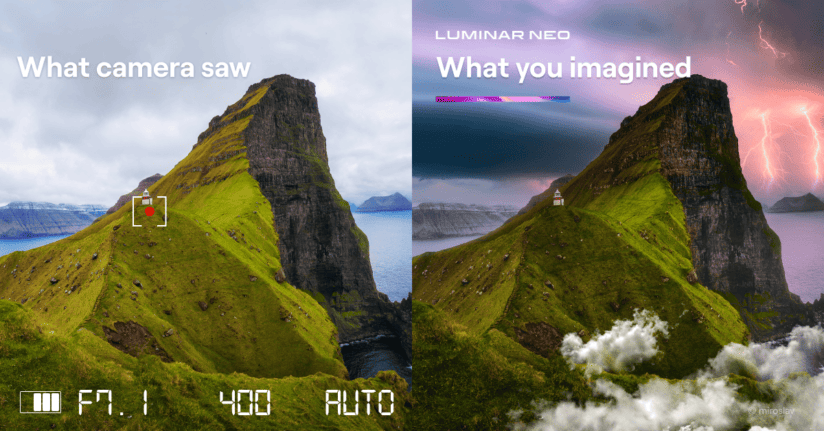
Artificial Intelligence Tools explained.
With its Artificial Intelligence or AI features you can quickly swap out skies or soften skin in a portrait in seconds, with just the press of a button or by adjusting a slider, it can give you the exact effect you want. This is what makes Luminar Neo so special and please do remember Skylum is the company pioneering in AI software and not just following other companies.
Of course, with any of these AI effects you are still in full control, for the two examples above you can choose the sky to be inserted and even position it exactly to your liking and crazily even adjust the lighting of the foreground to reflect the colour of the sky also.
Again with portrait editing you can of course get the exact level of skin smoothness you need or remove blemishes and adjust eye and mouth detail in seconds. Giving you massive control and again making these adjustments are all so easy to use even a complete beginner can do it with ease.
These are just two very quick examples of how good this software really is and there are plenty of other awesome AI applications like Dust spot removal, Powerline AI, Light Depth, Portrait Bokeh AI, Portrait Background Removal etc… I have them all explained and listed further down this page.
Catalogue Features
Neo has a catalog or Digital Asset Management facility, so you can quickly store all your images and rate them from one to five stars or you can also colour code them, this is very handy as you can put all your family shots under the blue label, Landscapes in Red, Seascapes in Green etc… As well as having your all-time favourite shots in your five-star folder so you can quickly group them all together.
So the catalogue function is great and it has you fully covered there.
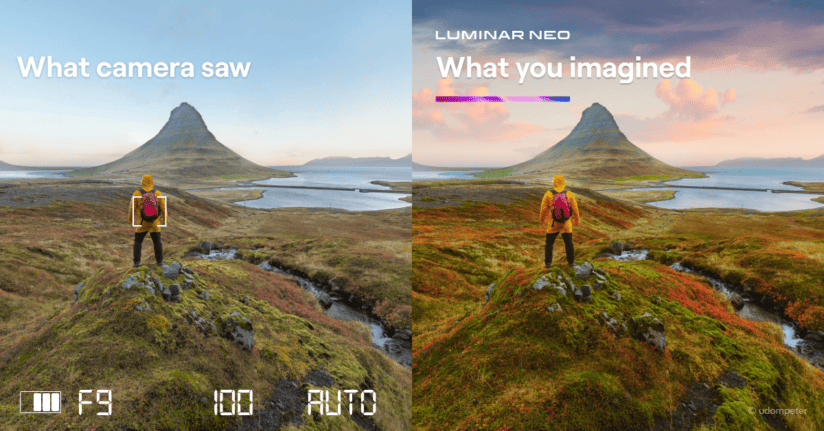
Luminar Neo review before and after image

If you purchase Luminar Neo via one of my affilaite links I may make a slight commission but it doesn’t cost you anything in fact you save money with my discount code so thank you for supporting my channel and website.

Is Luminar Neo Right For You?
I am always saying to my Photography Workshops clients “You will be the one using it, so do make sure to try it before you buy it” With my Free Trial Link further down the page, please also check the Minimum system specs needed, Neo likes fast computers (just like all the other editing platforms out there).
All editing software is power-hungry and this truly has to be the only real downside of Luminar Neo.
A run-through of all the Features
The first and most important feature is the catalog or Digital Asset Management (DAM) facility which means you can easily sort and organize your photographs so you can easily pop into different categories and groups like family, macro, landscape etc… and find them all in your grouped photographs together very quickly. That is going to be a serious time saver over the years.
Also, don’t forget to check out my reviews on the new Extensions for Neo simply click on the name to read it.
Noiseless AI, Background Removal AI, Upscale AI, Focus Stacking, HDR Merge, SuperSharp AI and Magic Light AI.
Basic editing controls include
Exposure, shadows, highlights, Curves, Contrast, Colour, Vibrancy, HSL, Sharpening sliders etc… the list goes on but suffice it to say everything you need in basic to advanced editing controls is in there. They all work as expected and again this is something you can see in my Luminar Neo review video above.
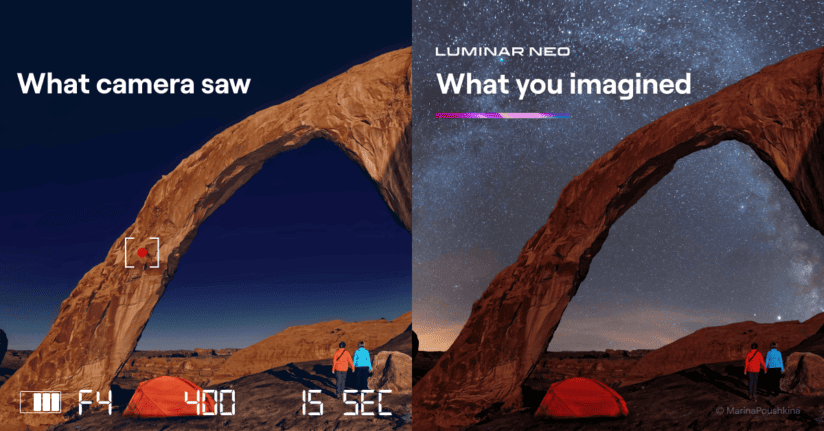
Landscape editing features
Sky Replacement in Sky AI
This feature works super smoothly and is not only super fast to use but incredibly simple also with a whole multitude of controls so you can adjust the horizontal and vertical position of the sky as well the brightness and the relighting facility as well as reflections on water etc… again the video review is the one that’s going to show all that off.
Light Depth (replacing Relight AI)
As of the Fall 2025 update, Relight AI has been replaced by Light Depth — and this is a serious upgrade. Instead of just “front” and “back” lighting adjustments, Light Depth lets you place virtual light sources anywhere in three-dimensional space within your image. You can adjust direction, intensity, temperature, and brightness for near and far areas independently.
For landscape work this is transformative. Shooting an Irish coastal scene where the foreground fell into shadow? Light Depth can realistically lift the foreground lighting without flattening the sky — something the old Relight AI always struggled with. It’s also brilliant for seascape photography where you want to bring dimension back to a scene shot in flat afternoon light.
This alone is a good reason to update if you’ve been holding off.
Powerline Removal AI
The Powerline removal tool is a very handy one for quickly and easily removing those annoying powerlines from your photographs with the press of a button it takes only a second to magically erase those pesky powerlines.
Focus Stacking
The Focus stacking extension is available now for Luminar and for my full Focus Stacking review here.
HDR Merge
Has now been added to Luminar in version 1.2 HDR Merge is basically a rebadged version of Aurora HDR is a fantastic HDR editing software.
Noiseless AI
Noiseless AI has just been launched and is available now, you can find out more about it here on my blog post dedicated to this new expansion pack for Luminar or watch the video at the end of this article if you prefer.
There are of course loads more AI tools and non-AI-based tools in Luminar for landscape Photographers like Upscale AI, Supersharp AI and of course the awesome golden hour and foilage enhancer controls. I run you through most of the Landscape editing features in my Tutorial video further up the page.
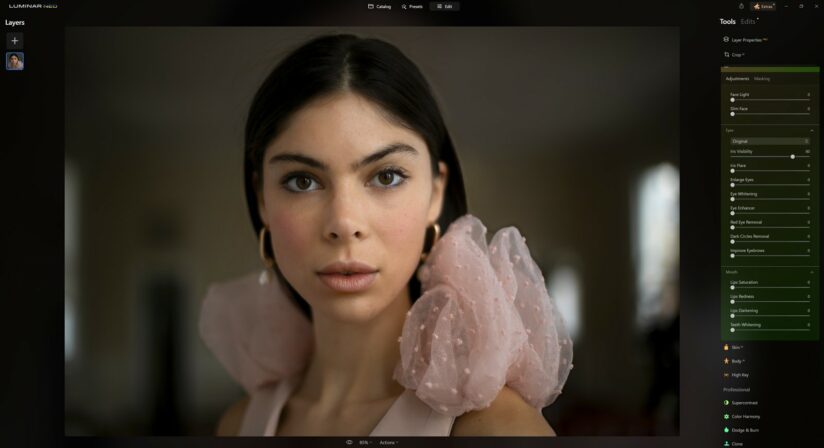
Portrait Editing features
Portrait Bokeh AI (upgraded in Spring 2026)
Portrait Bokeh AI got a major rebuild in the Spring 2026 update, now using a 3D depth model similar to Light Depth. This gives you much finer control over where the focus falls and how the background blur behaves. You can still adjust background brightness, colour temperature, highlights glow and the depth of the effect — but the results are significantly more natural than the previous version.
For portraits shot on slower lenses, this is a genuine alternative to buying a fast prime.
Face AI gives us several amazing features including…
- Face lighting As you probably guessed this gives us the option to adjust the brightness of the person’s face in the photograph. In seconds you can transform the look of a portrait with little to no editing skill needed.
- Slim FaceAgain this is fairly straightforward, you can via the use of a slider adjust the width of a face in an image which can be great for some of those unflattering camera angles that happen occasionally.
- Eye AdjustmentsYou can in the blink of an eye (see what I did there) change the eye colour and whiten or brighten the eyes with the aid of a few sliders.
- Mouth AdjustmentsThis section includes controls for Lip saturation, Lips Redness, Lips darkening and teeth whitening. These sliders are super easy to use and only take seconds.
Skin AI (enhanced in Spring 2026)
Skin AI was significantly improved in the Spring 2026 update, with dedicated controls for Blemish Removal, Shine Removal, Skin Smoothing, and Dark Circles Removal. Each is fine-tuned and individually controllable, meaning you can target exactly what you need without affecting other aspects of the skin.
The whole module has been reworked to avoid the “plastic skin” look that was a known weak point in earlier versions. For portrait photographers, this is the biggest Skin AI upgrade in the software’s history.
Body AI
Body AI is again one of those features that helps correct those unflattering camera angles with Shape and Abdomen slider controls.
High Key
Again there are several sliders here to give you the desired high-key effect in your image… I really like this one combined with Portrait Bokeh AI and the dodge and burn tool. You can create some really cool edits across the three adjustments.
Luminar Neo Price and special offers
One of the most important aspects of any software review has to be the price and at the time of writing this Luminar Neo Review, the Luminar Neo price was $99.- but my discount code (below) will give you another 10% off that price making it a pure bargain.
Luminar Neo Free Trial
Now, with any photography editing software, I always recommend you don’t just take my word for it. It’s very important that you download the Luminar Neo Free trial and check it out for yourself before you buy it for a few simple reasons…
- We are all using different computers with varying speeds.
- We all have different editing styles, some are far more complex than others.
- More importantly, we also work with different cameras with different resolutions and file sizes.
That’s why I say you should always try before you buy and get your Free Trial Here.
When was the Luminar Neo official release date?
Neo was released on the 17th of February 2022. There was also a pre-release on the 10th of February to the early bird purchasers of which there was 30,000. However, the official release date was the 17th of February 2022.
Is Luminar Neo better than Lightroom?
Adobe Lightroom has been the default editing platform now for some time but has that changed and has Neo not only caught up to it but challenged it for the title? Well, to fully understand their difference and which one might be better for you then I recommend you read my Luminar vs Lightroom review here.
Why is Luminar Neo so much better now than it was?
Well, that’s down to the amount of work that has gone into this software, which is now truly starting to show and with every update it just keeps getting better and better, for me the turning point was the addition of the awesome new extensions.
The extensions have been a real game changer for me and they have prompted me to rewrite my review.
Now, I know a few people think the extensions should be included as standard with the software but knowing how much work has gone into their development, which I have to say is still going full speed ahead, Skylum software has heavily invested in them, so they need to get some money back out of it to make it profitable and keep progressing their development.
Please remember these extensions are optional so if you don’t need them then you can skip that purchase.
What’s next for Neo?
Skylum has been on a proper tear with Luminar Neo development over the past 12 months. The Fall 2025 update brought Light Depth, Restoration, AI Assistant, and the Luminar Ecosystem. The Spring 2026 update (released 9th April 2026) delivered enhanced Bokeh AI, improved Skin AI, and the long-awaited mask feathering and shift edges tools.
The pace of development shows no signs of slowing, and with each update Neo closes the gap with Adobe’s ecosystem — while Luminar’s upscaling, sharpening, and noise-reducing tools are now genuinely competitive with Topaz Labs’ offerings at a fraction of the cost.
The next update is expected in Autumn 2026 and I’ll update this review when we see what’s coming.
In my full review video and tutorial above you can see me running through all the features, facilities and sliders in it.
Would I buy Luminar Neo and use it professionally?
In all honesty, up until a couple of years ago, I would have probably said no. Since then the software has transformed, and with the Fall 2025 and Spring 2026 updates adding Light Depth, Restoration, enhanced masking, and the Ecosystem, my answer today is an unreserved yes. For anyone starting out now, this is an incredible piece of photography editing software.
Some of you may not know that I earn my living as a commercial/fashion photographer and as a Landscape photographer. Yes, I do both, I am mad I know but the beauty of it is that I get to choose my clients. I take my photography editing software very seriously as it’s part of my living and anything that can make my workflow easier and faster is going to be a serious plus for me.
Editing Results
The edited results from Neo are every bit as good as the ones I am getting from Lightroom if not better most of the time, so purely from a results point of view it’s not like there is a downgrade there more like an upgrade.
The one point I would like to mention here is I am finding the colour tones coming from the raw files from both my camera and drone just look better or more natural in Neo than they do in Lightroom which is an odd one.
I have found specifically with my Mavic 3 pro I prefer the results I am getting from Luminar, with my Nikon Z7ii the RAW files are usually very close between the two applications but in certain scenes (especially on outdoor bright daylight scenes) Neo handles the colouring just slightly better and looks more natural.

Review Conclusion
Luminar Neo is, without doubt, one of the best all-around editing platforms available for the money, and it has truly grown into the photography editing suite Skylum has been promising us. It’s fast, precise, and its AI features are genuinely ground-breaking.
The Fall 2025 and Spring 2026 updates have pushed it into new territory — and with Skylum’s consistent update cadence, the software just keeps getting better.
Thanks for reading my review I hope it helped you to decide if Luminar is right for you and what you need from your photography editing software.
If you are looking for the ultimate portrait editing software then check out my Skylum Aperty Review here
If you are going to buy Neo then please do check out my money-saving offers here.
Please do feel free to check out my reviews and tutorials of the latest Expansion packs in the menu above under the “Software” section.
See you out there,
Kieran.

Luminar Neo Review 2026 — Features, Pros & Cons + Verdict
In‑depth Luminar Neo review 2026 — explore features, AI tools, performance, pros & cons, comparisons, and whether it’s worth your money.
4.9
Pros
- Excellent landscape editing tools, including Sky AI and Atmosphere AI.
- Strong portrait features with intuitive AI enhancements.
- All‑in‑one photo editor with both basic and advanced tools.
- Powerful AI tools that save time without sacrificing quality.
- Cross‑platform editing on Windows and macOS.
- User‑friendly interface with a gentle learning curve for beginners.
Cons
- Can require a fast computer for smooth performance.
- Cataloging and file management tools are less advanced than Lightroom’s.
- Some AI tools may not always give perfect results and need manual adjustment.
- Occasional lag or UI quirks reported on certain systems.